Case management built for the way nonprofits actually work
Every feature in
Complete case management, built around your programs
Manage the full client journey in one place — intake, case notes, service tracking, goal plans, and referrals.
- Configurable intake & eligibility screening
- Time-stamped case notes & service logs
- Goal plans with progress tracking
- Referrals & coordinated care across programs
Clients as active partners in their own progress
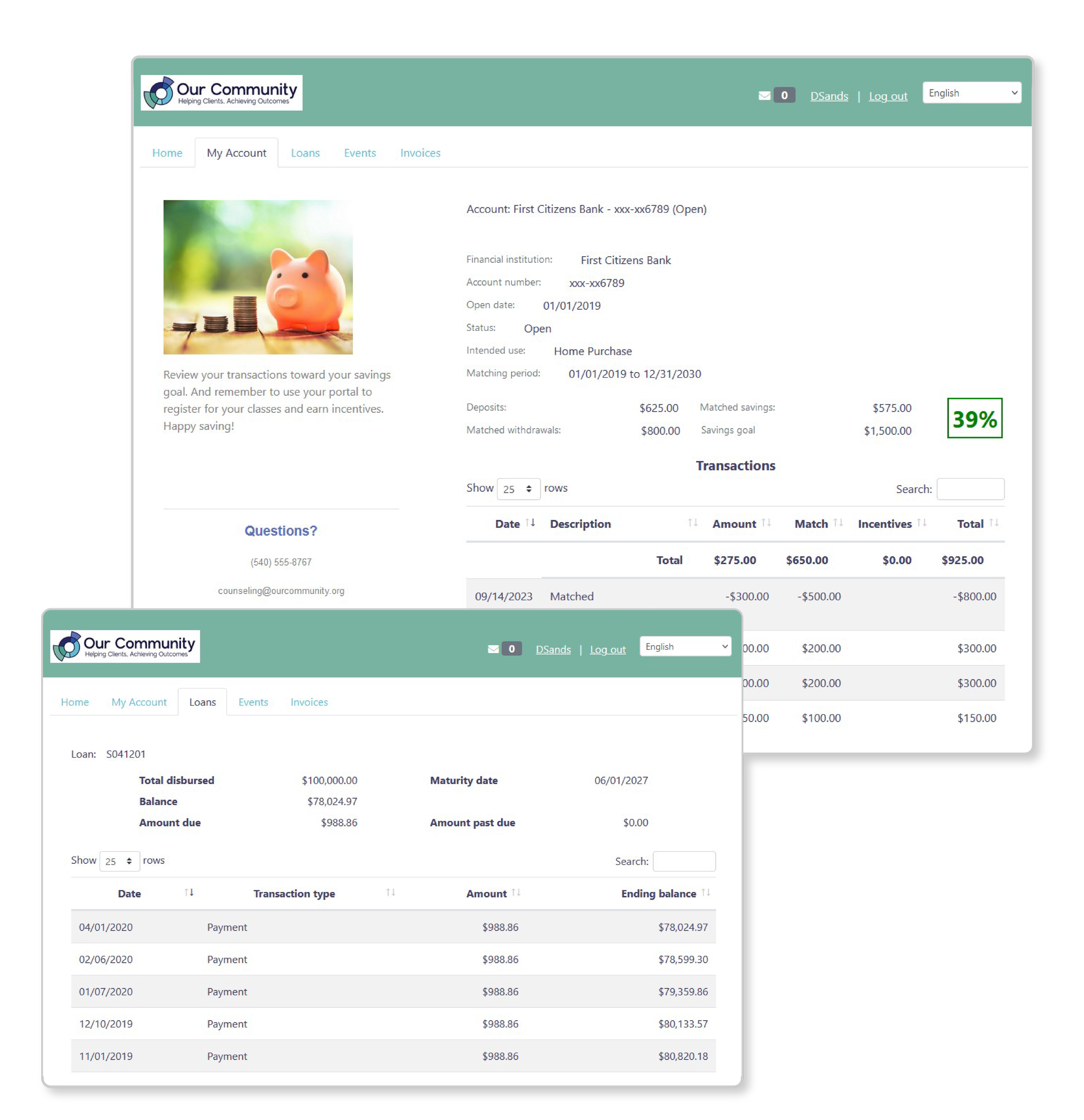
Give participants a secure, personalized portal where they can check in on their goals, complete surveys, and see their own progress over time. When clients are engaged, your outcomes improve.
- Secure login — no app download required
- Mobile-friendly for any device
- Automatic check-in reminders
- Multilingual support available
Outcome surveys that meet clients where they are
Build intake, mid-program, and exit surveys using validated instruments or your own questions. Collect data digitally, on paper, or via staff-assisted entry — whatever works for your population.
- Library of validated outcome tools (PHQ-9, AUDIT, etc.)
- Custom question builder
- Paper-to-digital scanning
- Conditional logic & skip patterns
Funder reports in minutes, not weeks
Stop spending days before grant deadlines pulling data together.
- Pre-built funder report templates
- Export to PDF, Excel, or Word
- Automated outcome narratives
- Board presentation slides
Oh, and did we mention…
Your clients can do it all — from any device
Right from their phone or computer, clients can take care of everything themselves:
- Submit applications
- Complete surveys
- Access portals to view and manage their data
- Self-register and pay fees
- Add electronic signatures
- Send and receive emails and text messages
- Review balances on incentives and savings accounts
- Create, manage, and link 529 accounts
- Link their own savings account
Tell your impact story — no code needed
Turn your data into compelling visuals and reports without touching a single line of code:
- Create queries by simply answering questions
- Build custom reports in minutes
- Analyze trends with crosstab tables
- Illustrate outcomes with charts and graphs
- Show outcome and performance indicators over time
Integrate with the tools you already use
Connect
- Export to spreadsheets
- Import from spreadsheets
- Schedule automatic data exchanges with multiple sources
- Sync email lists with Emma or Constant Contact
- Segment outreach with filters based on client interactions
- Send or schedule individual or personalized batch messages
- Connect bank or credit union accounts
- Connect Ascensus or TIAA 529 accounts
- Link individual savings accounts
- Sync loans data with DownHome Loan Manager
- Report to SBA Nexus (formerly EDMIS)
- Submit HUD 9902 reports
See every feature in action
Schedule a personalized demo and we'll walk through the features most relevant to your organization.
Chat with us
We typically reply within a few hours
We'll be in touch at your email shortly.